mirror of
https://github.com/iDescriptor/iDescriptor.git
synced 2026-06-22 03:45:51 +08:00
 uncor3
340 lines
12 KiB
Markdown
340 lines
12 KiB
Markdown
<p align="center" style="text-align: center">
|
|
<img src="./resources/icons/app-icon/icon.png" width="25%"><br/>
|
|
</p>
|
|
|
|
<p align="center">
|
|
Cross-platform, open-source and free idevice management tool written in C++
|
|
<br/>
|
|
<br/>
|
|
<a href="https://github.com/iDescriptor/iDescriptor/blob/main/LICENSE">
|
|
<img alt="GitHub" src="https://img.shields.io/github/license/iDescriptor/iDescriptor"/>
|
|
</a>
|
|
<a href="https://github.com/iDescriptor/iDescriptor/issues">
|
|
<img src="https://img.shields.io/badge/contributions-welcome-brightgreen.svg?style=flat" alt="CodeFactor" />
|
|
</a>
|
|
<a href="https://github.com/iDescriptor/iDescriptor/actions/workflows/build.yml" rel="nofollow">
|
|
<img src="https://img.shields.io/github/actions/workflow/status/iDescriptor/iDescriptor/build-linux.yml?branch=main&logo=Github" alt="Build" />
|
|
</a>
|
|
<a href="https://github.com/iDescriptor/iDescriptor/tags" rel="nofollow">
|
|
<img alt="GitHub tag (latest SemVer pre-release)" src="https://img.shields.io/github/v/tag/iDescriptor/iDescriptor?include_prereleases&label=version"/>
|
|
</a>
|
|
<img alt="Platform" src="https://img.shields.io/badge/Platform-Windows%20%7C%20macOS%20%7C%20Linux-blue.svg"/>
|
|
<img alt="Language" src="https://img.shields.io/badge/C++-20-hotpink.svg"/>
|
|
<img alt="Qt" src="https://img.shields.io/badge/Qt-6-brightgreen.svg"/>
|
|
<a href="https://github.com/iDescriptor/iDescriptor/releases">
|
|
<img src="https://img.shields.io/badge/AppImage-available-brightgreen" alt="AppImage"/>
|
|
</a>
|
|
<a href="https://aur.archlinux.org/packages/idescriptor-git">
|
|
<img src="https://img.shields.io/badge/Arch_AUR-available-brightgreen" alt="AppImage"/>
|
|
</a>
|
|
<br/>
|
|
<br/>
|
|
<a href="https://opencollective.com/idescriptor">
|
|
<img src="https://img.shields.io/badge/OpenCollective-1F87FF?style=for-the-badge&logo=OpenCollective&logoColor=white" alt="AppImage"/>
|
|
</a>
|
|
</p>
|
|
|
|
## Download
|
|
|
|
<p align="center">
|
|
<a href="https://github.com/iDescriptor/iDescriptor/releases/latest">
|
|
<img src="https://img.shields.io/badge/Windows-0078D6?style=for-the-badge&logo=windows&logoColor=white" alt="Download for Windows"/>
|
|
</a>
|
|
<a href="https://github.com/iDescriptor/iDescriptor/releases/latest">
|
|
<img src="https://img.shields.io/badge/macOS-000000?style=for-the-badge&logo=apple&logoColor=white" alt="Download for macOS"/>
|
|
</a>
|
|
<a href="https://github.com/iDescriptor/iDescriptor/releases/latest">
|
|
<img src="https://img.shields.io/badge/Linux-FCC624?style=for-the-badge&logo=linux&logoColor=black" alt="Download for Linux"/>
|
|
</a>
|
|
<a href="https://aur.archlinux.org/packages/idescriptor-git">
|
|
<img src="https://img.shields.io/badge/Arch_AUR-1793D1?style=for-the-badge&logo=arch-linux&logoColor=white" alt="Install from AUR"/>
|
|
</a>
|
|
</p>
|
|
|
|
### Installation Instructions
|
|
|
|
#### Windows
|
|
|
|
- **Installer (.msi)**: Download and run the installer. Recommended for most users.
|
|
- **Portable (.zip)**: Extract and run `iDescriptor.exe`. No installation required.
|
|
- **Choco** :
|
|
|
|
```bash
|
|
choco install idescriptor --version=0.1.0
|
|
```
|
|
|
|
#### macOS
|
|
|
|
- **Apple Silicon**: Download the `.dmg` file for M1/M2/M3/MX Macs.
|
|
<br/>
|
|
Open the `.dmg` and drag iDescriptor to Applications.
|
|
<br/>
|
|
|
|
After moving the app to Applications, run the code below
|
|
<br/>
|
|
|
|
```shell
|
|
xattr -c ~/Applications/iDescriptor.app
|
|
```
|
|
|
|
[Click here to learn more about why this is needed](#damaged-error-on-macos).
|
|
|
|
- **Intel**: Download the `.dmg` file for Intel-based Macs.
|
|
<br/>
|
|
Open the `.dmg` and drag iDescriptor to Applications.
|
|
<br/>
|
|
|
|
You shouldn't run into any issues on Intel Macs but if you do, [check this out](#damaged-error-on-macos).
|
|
|
|
#### Linux
|
|
|
|
- **AppImage**: Download, unzip, and run.
|
|
- **Arch Linux**: Install from AUR:
|
|
|
|
```bash
|
|
sudo pacman -Syu
|
|
yay -S idescriptor-git
|
|
```
|
|
|
|
make sure to do "sudo pacman -Syu" otherwise it's not going to find libimobiledevice>=1.4.0
|
|
|
|
<hr/>
|
|
<br/>
|
|
|
|
<p align="center">
|
|
<img src="./resources/repo/crossplatform.png"><br/>
|
|
</p>
|
|
|
|
</br>
|
|
</br>
|
|
</br>
|
|
|
|
## Good News!
|
|
|
|
### iDescriptor v0.3.0 will feature **WIRELESS CONNECTION** support!
|
|
|
|
Learn more about our roadmap [here](#roadmap).
|
|
|
|
</br>
|
|
</br>
|
|
</br>
|
|
|
|
## Features
|
|
|
|
### Connection
|
|
|
|
| Feature | Status | Notes |
|
|
| ------------------- | -------------------- | --------------------------------------------------------------- |
|
|
| USB Connection | ✅ Implemented | Fully supported on Windows, macOS, and Linux. |
|
|
| Wireless Connection | ⚠️ Under Development | Currently under development, planned to be released in v0.3.0 |
|
|
|
|
### Tools
|
|
|
|
| Feature | Status | Notes |
|
|
| ------------------------------------------------------ | -------------- | ------------------------------------------------------------------------------------- |
|
|
| [AirPlay](#airplay) | ✅ Implemented | Cast your device screen to your computer. |
|
|
| [Download & Install Apps From Apple Store](#app-store) | ✅ Implemented | Download and install apps directly from the Apple Store. |
|
|
| [Virtual Location](#virtual-location) | ✅ Implemented | Simulate GPS location. Requires a mounted Developer Disk Image. **( iOS 6 - iOS 16)** |
|
|
| [iFuse Filesystem Mount](#ifuse-filesystem-mount) | ✅ Implemented | Mount the device's filesystem. (Windows & Linux only) |
|
|
| Gallery | ✅ Implemented | - |
|
|
| File Explorer | ✅ Implemented | Explore the device's filesystem. |
|
|
| Wireless Gallery Import | ✅ Implemented | Import photos wirelessly (requires the Shortcuts app on the iDevice). |
|
|
| [Cable Info](#cable-info) | ✅ Implemented | Check authenticity of connected USB cables and more. |
|
|
| [Network Device Discovery](#network-device-discovery) | ✅ Implemented | Discover and monitor devices on your local network. |
|
|
| [SSH Terminal](#ssh-terminal) **(Jailbroken)** | ✅ Implemented | Open up a terminal on your iDevice. |
|
|
| Query MobileGestalt | ✅ Implemented | Read detailed hardware and software information from the device. |
|
|
| [Live Screen](#live-screen) | ✅ Implemented | View your device's screen in real-time **(wired)**. |
|
|
| Developer Disk Images | ✅ Implemented | Manage and mount developer disk images. **( iOS 6 - iOS 16)** |
|
|
|
|
### Device Actions
|
|
|
|
| Feature | Status | Notes |
|
|
| ------------------- | -------------- | ----- |
|
|
| Restart Device | ✅ Implemented | - |
|
|
| Shutdown Device | ✅ Implemented | - |
|
|
| Enter Recovery Mode | ✅ Implemented | - |
|
|
|
|
## Fully Theme Aware
|
|
|
|
<p align="center">
|
|
<img src="./resources/repo/macos-theme.gif"><br/>
|
|
</p>
|
|
<p align="center">
|
|
<img src="./resources/repo/ubuntu-theme.gif"><br/>
|
|
</p>
|
|
|
|
## AirPlay
|
|
|
|
### Cast your device screen to your computer!
|
|
|
|
<p align="center">
|
|
<img src="./resources/repo/airplay.gif"><br/>
|
|
</p>
|
|
|
|
## App Store
|
|
|
|
### Download and Install Apps directly from the Apple Store!
|
|
|
|
You need to sign in with your Apple ID to use this feature.
|
|
|
|
<p align="center">
|
|
<img src="./resources/repo/ipatool.png"><br/>
|
|
</p>
|
|
|
|
## Virtual Location
|
|
|
|
### Simulate GPS location on your iDevice! (iOS 6 - iOS 16)
|
|
|
|
<p align="center">
|
|
<img src="./resources/repo/virtual-location.png"><br/>
|
|
</p>
|
|
|
|
## iFuse Filesystem Mount
|
|
|
|
### Use your iDevice as a regular DRIVE!
|
|
|
|
Literally mount your iDevice filesystem and use it as a regular drive , read and write are both allowed. Don't try to import photos or videos because it won't work that way, use the Gallery Import feature for that.
|
|
|
|
#### Windows
|
|
|
|
<p align="center">
|
|
<img src="./resources/repo/win-ifuse.gif"><br/>
|
|
</p>
|
|
|
|
#### Ubuntu / Linux
|
|
|
|
<p align="center">
|
|
<img src="./resources/repo/ifuse.gif"><br/>
|
|
</p>
|
|
|
|
### Gallery
|
|
|
|
<p align="center">
|
|
<img src="./resources/repo/gallery.png"><br/>
|
|
</p>
|
|
|
|
### File Explorer
|
|
|
|
<p align="center">
|
|
<img src="./resources/repo/file-explorer.png"><br/>
|
|
</p>
|
|
|
|
## Cable Info
|
|
|
|
<p align="center">
|
|
<img src="./resources/repo/cable-info-genuine.png"><br/>
|
|
</p>
|
|
|
|
## Network Device Discovery
|
|
|
|
<p align="center">
|
|
<img src="./resources/repo/network-devices.png"><br/>
|
|
</p>
|
|
|
|
## SSH Terminal
|
|
|
|
### Open up a terminal on your Jailbroken iDevice!
|
|
|
|
<p align="center">
|
|
<img src="./resources/repo/ssh-terminal.gif"><br/>
|
|
</p>
|
|
|
|
## Live Screen
|
|
|
|
Useful if your device does not support AirPlay
|
|
|
|
<p align="center">
|
|
<img src="./resources/repo/live-screen.png"><br/>
|
|
</p>
|
|
|
|
## **Authentication Required** ?
|
|
|
|
You might get this pop-up on any platform this is because this app uses secure backends to retrieve and store your Apple credentials. You can disable this in settings but it is not recommended and not safe for your Apple account. Also if you leave this enabled and sign in you can use the same credentials in ipatool without signing in again.
|
|
|
|
<p align="center">
|
|
<img src="./resources/repo/authentication-required.png"><br/>
|
|
</p>
|
|
|
|
## Become a Sponsor
|
|
|
|
Please support us at <a href="https://opencollective.com/idescriptor">
|
|
<img src="https://img.shields.io/badge/OpenCollective-1F87FF?style=for-the-badge&logo=OpenCollective&logoColor=white" alt="AppImage"/>
|
|
</a>
|
|
|
|
## Thanks
|
|
|
|
- [libimobiledevice](https://libimobiledevice.org/)
|
|
- [ipatool](https://github.com/majd/ipatool) - We use a modified version [here](https://github.com/uncor3/libipatool-go)
|
|
- [QSimpleUpdater](https://github.com/alex-spataru/QSimpleUpdater) - We use a modified version [here](https://github.com/uncor3/ZUpdater)
|
|
- [airplay](https://github.com/rcarmo/RPiPlay) - We use a modified version [here](https://github.com/uncor3/airplay)
|
|
|
|
## Linux Udev Rules
|
|
|
|
iDescriptor will check for udev rules but in case it fails, you can manually add the udev rules by doing similar to the following:
|
|
|
|
```bash
|
|
@uncore sudo cat /etc/udev/rules.d/99-idevice.rules
|
|
SUBSYSTEM=="usb", ATTR{idVendor}=="05ac", MODE="0666"
|
|
|
|
✘ Sun 6 Jul - 14:29 ~
|
|
@uncore sudo groupadd idevice
|
|
|
|
Sun 6 Jul - 14:30 ~
|
|
@uncore sudo usermod -aG idevice $USER
|
|
|
|
Sun 6 Jul - 14:30 ~
|
|
@uncore sudo udevadm control --reload-rules
|
|
sudo udevadm trigger
|
|
```
|
|
|
|
# Contributing
|
|
|
|
Contributions are welcome!
|
|
|
|
We actively develop on dev branch, so please base your pull requests off of that branch.
|
|
|
|
You can also send a pr to main branch but it should be something related to building, publish to some package manager or documentation.
|
|
|
|
|
|
## Roadmap
|
|
|
|
**Planned Features for v0.3.0:**
|
|
|
|
- Migrato idevice-rs `99% done`
|
|
- Wireless Connection Support `DONE`
|
|
- Install IPA files directly from the app
|
|
- Virtual Location Support for iOS 17 and above
|
|
- Complete iOS 26 Support
|
|
- Migrate to UCRT for better performance and stability ``Windows``
|
|
- New UI/UX improvements
|
|
- Read gallery from Photos.sqlite (maybe delayed to v0.4.0)
|
|
|
|
|
|
**You can always become a sponsor/donate to request/prioritize a feature or speed up the development process!**
|
|
|
|
## Damaged Error on macOS
|
|
|
|
<p align="center">
|
|
<img src="./resources/repo/damaged-error-macos.png" width="55%"><br/>
|
|
</p>
|
|
|
|
If you encounter a similar "damaged" error when trying to open the app on macOS, you can resolve this by running the following command in the terminal:
|
|
|
|
```shell
|
|
xattr -c ~/Applications/iDescriptor.app
|
|
```
|
|
|
|
You need to run this because macOS blocks apps that are not signed by an Apple Developer ID. By clearing the extended attributes, you can bypass this security feature.
|
|
|
|
This not something specific to iDescriptor, for example [check this out](https://github.com/deskflow/deskflow/issues/7606).
|
|
|
|
You can be more explicit and only remove the quarantine attribute like so:
|
|
|
|
```shell
|
|
xattr -dr com.apple.quarantine /Applications/iDescriptor.app
|
|
```
|
|
|
|
## Star History
|
|
|
|
[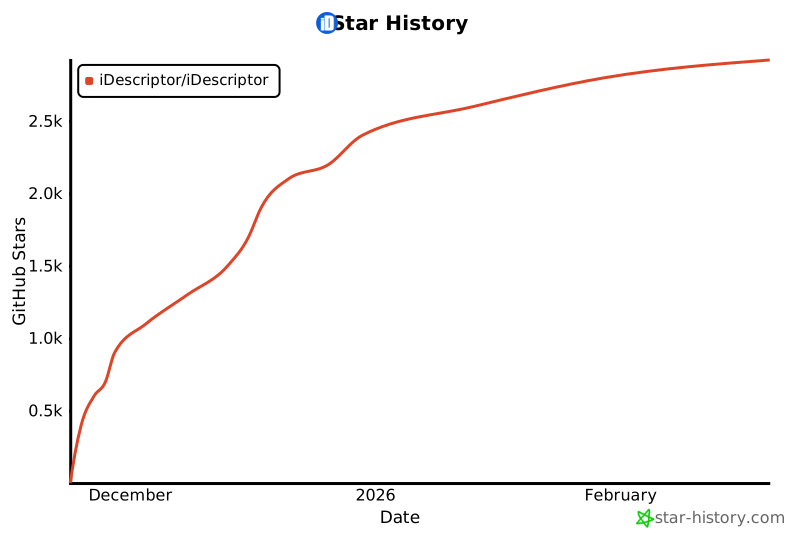](https://www.star-history.com/#iDescriptor/iDescriptor&type=date&legend=top-left)
|